
I cannot find the "Appdata"-FolderUpdated 5 months ago
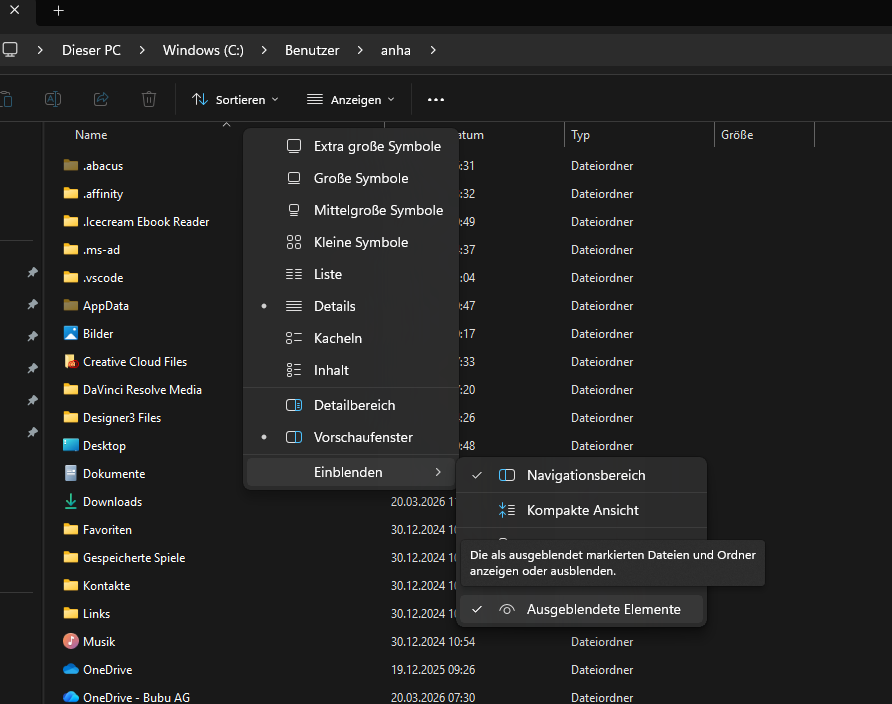
The ‘AppData’ folder is automatically hidden by Windows. You can easily make it visible in just two steps:
- Navigate to your ‘User’ folder – usually your name or login name
- In the folder, under “View” / ‘Show hidden files’, click on ‘Hidden items’
You should now be able to see the AppData folder and navigate further. Good luck!
If that didn’t solve your problem, we’d be happy to help. Just get in touch via email or by phone on +41 44 949 44 99