Photo calendar: How can I design the calendar?Updated 8 months ago
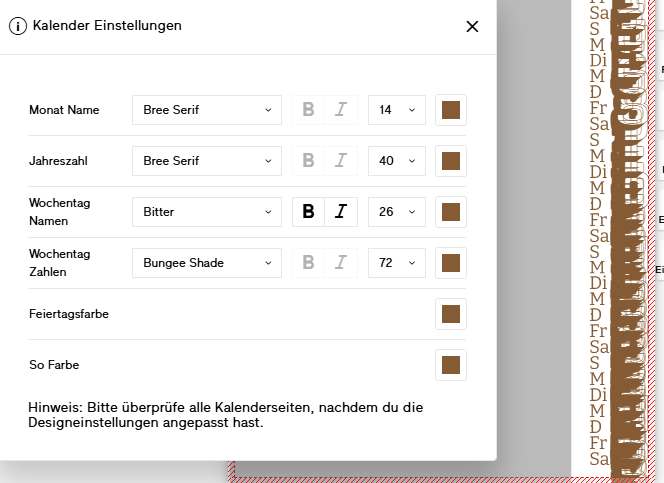
The calendar can only be customised to a limited extent in the Bookfactory software, but relatively freely in the online editor. Here are the instructions for this
Bookfactory Software:
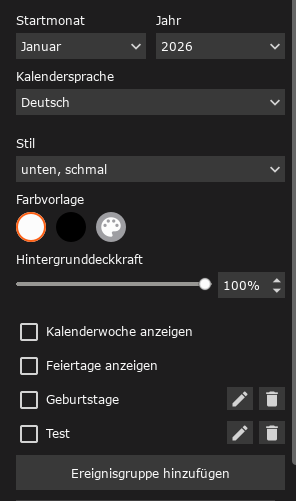
Style:
You can choose whether you want the calendar at the bottom or on the side, large or small, or no calendar at all.
Colour template:
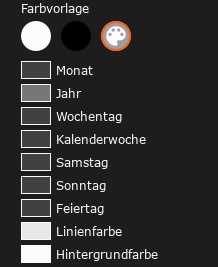
You can choose whether you want the calendar to be white with black text or black with white text. The colour palette icon is a detailed selection where you can colour the individual days differently: Here, too, you can select the background colour, but the text colour no longer adjusts automatically.
Finally, you can save event groups, such as birthdays or other important occasions that you already know about when creating the calendar.
Online Editor:
In the online editor, you select the first template when you start.
In the calendar itself, you can also set up events and make adjustments to the numbers.
However, you need to be careful here: since you can also adjust the size and font, it can quickly happen that the text no longer fits on the pages.